- Accounting
- Finance
Cloud Accounting in 2026: Why Spreadsheets Are Killing Your Financial Visibility
Still managing finances in spreadsheets or desktop software? Modern cloud accounting automates reconciliation, ensures tax compliance, and delivers real-time financial insights that drive better business decisions.
The Spreadsheet Trap
Spreadsheets are the world’s most popular accounting tool — and one of the most dangerous. Here’s why:
- 88% of spreadsheets contain errors, according to research from the University of Hawaii
- Version control is nearly impossible when financial files are emailed between team members
- No audit trail — who changed what, when, and why?
- Manual reconciliation that consumes hours every month
- Limited scalability — what works for 50 transactions breaks at 5,000
If your finance team is spending more time managing data than analyzing it, you have a technology problem masquerading as a people problem.
What Modern Cloud Accounting Delivers
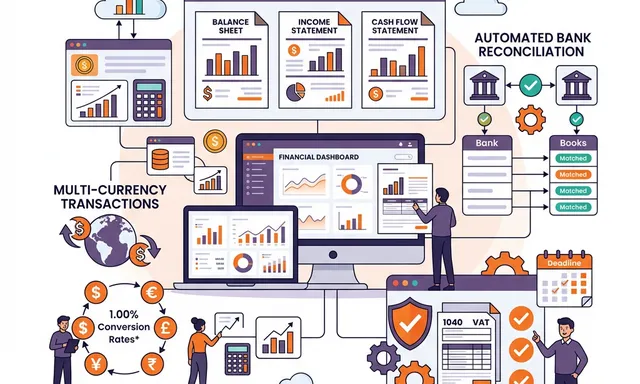
Automated Bank Reconciliation
The most time-consuming accounting task, automated:
- Bank feeds — transactions imported automatically from 15,000+ financial institutions
- Smart matching — AI-powered rules that match bank transactions to invoices and bills with 95%+ accuracy
- Exception-based processing — humans only review the 5% that don’t match automatically
- Real-time cash position — always know your exact cash balance across all accounts
Time savings: What used to take 2–3 days per month now takes 2–3 hours.
Multi-Currency Support
For international businesses, currency management is essential:
- Automatic exchange rate updates from central bank feeds
- Unrealized gain/loss tracking on open invoices and bills
- Currency revaluation reports at any point in time
- Multi-currency financial statements for consolidated reporting
Tax Compliance & Reporting
Stay compliant without the headaches:
- Automated tax calculations based on customer location and product type
- Tax report generation for VAT, GST, sales tax, and withholding tax
- Regulatory filing support for multiple jurisdictions
- Audit-ready documentation with full transaction trails
- Fiscal year management with multi-period comparisons
Real-Time Financial Reporting
Replace monthly report cycles with live dashboards:
- Profit & loss statements updated in real-time as transactions post
- Balance sheets reflecting the current financial position at any moment
- Cash flow forecasts projecting future liquidity based on outstanding receivables and payables
- Budget vs. actual comparisons with drill-down capability
- Custom KPI dashboards for executives and department heads
The Integrated Accounting Advantage
Standalone accounting software (QuickBooks, Xero, FreshBooks) works well for small businesses with simple needs. But as organizations grow, the limitations become painful:
Disconnected sales process:
- Invoice created manually after sales order
- Payment status not visible to sales team
- Revenue recognition requires manual journal entries
Disconnected inventory:
- Cost of goods sold calculated outside the system
- Inventory valuation done in spreadsheets
- Purchase orders and bills managed separately
Disconnected HR:
- Payroll processed in a separate system
- Expense reports emailed and manually entered
- Employee cost allocation requires manual distribution
The Odoo Solution
When accounting is part of an integrated ERP platform, these problems disappear:
- Sales orders automatically generate invoices when delivery is confirmed
- Purchase receipts trigger accrual entries — no more month-end surprises
- Inventory movements automatically update COGS using your chosen valuation method
- Payroll integrates directly with the general ledger
- Expense reports submitted by employees post automatically after approval
Financial Close: From Weeks to Days
The monthly financial close is a litmus test for accounting efficiency:
| Activity | Manual Process | Automated Process |
|---|---|---|
| Bank reconciliation | 2–3 days | 2–3 hours |
| Intercompany reconciliation | 1–2 days | Automatic |
| Accrual entries | 1 day | Automatic |
| Revenue recognition | 1 day | Automatic |
| Report generation | 1–2 days | Real-time |
| Total close time | 7–10 days | 1–2 days |
Choosing the Right Accounting Solution
For Small Businesses (< 20 employees)
Cloud-native tools like QuickBooks Online or Xero may be sufficient. They offer:
- Easy setup and low monthly cost
- Basic invoicing and expense tracking
- Simple financial reports
- Bank feed integration
For Mid-Market & Enterprise (20+ employees)
Integrated ERP accounting like Odoo provides:
- Full double-entry accounting with unlimited companies
- Multi-currency, multi-company, and multi-country support
- Automated intercompany transactions
- Advanced cost accounting and analytics
- Integration with operations, sales, HR, and inventory
- No per-user licensing fees
Getting Started
NETLINKS Inc. helps organizations transition from manual accounting to automated, integrated financial management. Whether you’re outgrowing QuickBooks or replacing a legacy ERP’s finance module, we deliver solutions that give you real-time financial clarity.
Stay Informed with Expert Insights
Discover the latest trends in ERP, AI, and digital transformation from our certified technology experts.
100+



Resources to boost
your growth