- Migration
- ERP
ERP Migration: How to Move From Legacy Systems Without Losing Data or Sleep
Migrating from a legacy ERP or upgrading Odoo versions doesn't have to be painful. Learn the 5-phase migration methodology that ensures zero data loss, minimal downtime, and a smooth transition for your entire team.
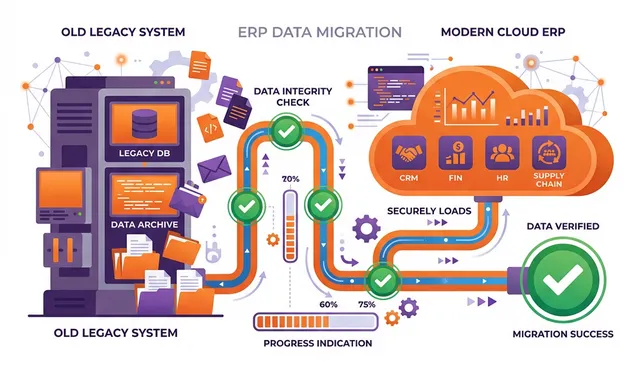
Why Legacy Systems Are Costing You More Than You Think
If your business is running on an ERP system from 10+ years ago — or worse, on a patchwork of spreadsheets, Access databases, and disconnected software — you’re paying a steep hidden tax:
- Maintenance costs that increase 15–20% annually as systems age
- Security vulnerabilities from unsupported software
- Integration headaches that prevent you from adopting modern tools
- Reporting limitations that leave executives flying blind
- Employee frustration that drives up turnover and slows recruitment
The question isn’t whether to migrate — it’s how to do it without disrupting your business.
The 5-Phase Migration Methodology
At NETLINKS Inc., we’ve completed 800+ successful migrations with a 100% data integrity rate. Our methodology eliminates the risks that derail most migration projects.
Phase 1: Assessment & Planning
Every migration begins with a comprehensive assessment:
- Current system audit — what data exists, where it lives, and how it’s structured
- Data quality analysis — identifying duplicates, inconsistencies, and gaps
- Business process review — mapping current workflows and identifying improvements
- Migration scope definition — determining what data migrates, what gets archived, and what gets left behind
- Risk assessment — identifying potential failure points and mitigation strategies
Deliverable: A detailed migration plan with timeline, resource requirements, and risk matrix.
Phase 2: Data Mapping & Transformation
This is where the technical heavy lifting begins:
- Field mapping — matching source data fields to target system fields
- Data cleansing — removing duplicates, fixing inconsistencies, and standardizing formats
- Transformation rules — defining how data changes during migration (e.g., currency conversion, code mapping, address formatting)
- Validation rules — creating automated checks to verify data integrity at every step
Phase 3: Trial Migration
We never gamble with your production data. Every migration includes at least one full trial run:
- Complete sandbox deployment of the target system
- Full data migration into the sandbox environment
- Automated validation comparing source and target data counts, totals, and key records
- User acceptance testing — your team validates that critical workflows work correctly with migrated data
- Issue remediation — fixing any mapping errors or transformation problems
Most migrations require 2–3 trial runs before achieving 100% validation.
Phase 4: Production Cut-Over
With trial migration validated, production cut-over follows a carefully choreographed plan:
- Communication — all stakeholders briefed on timeline and expectations
- Data freeze — lock source system to prevent changes during migration window
- Final migration — execute production data migration with validated scripts
- Validation — run comprehensive data integrity checks
- System verification — confirm all integrations and workflows function correctly
- Go/no-go decision — formal sign-off before users access the new system
Cut-over timing: We always schedule production cut-overs during off-hours (typically Friday evening through Sunday) to minimize business disruption.
Phase 5: Post-Migration Validation
The migration isn’t complete when the data moves — it’s complete when the business confirms everything works:
- Data integrity verification — automated reconciliation of key metrics (customer counts, financial balances, inventory quantities)
- Transaction testing — end-to-end testing of critical business processes
- Performance monitoring — ensuring system response times meet requirements
- User feedback collection — gathering and addressing user-reported issues
- Hypercare support — dedicated support team for the first 30 days
Common Migration Scenarios
Legacy ERP to Odoo
Migrating from SAP, Oracle, Microsoft Dynamics, or QuickBooks to Odoo is our most common scenario. Key considerations:
- Chart of accounts mapping — aligning financial structures between systems
- Customer and vendor data — consolidating and deduplicating contact records
- Transaction history — determining how many years of history to migrate
- Custom fields — mapping proprietary data structures to Odoo equivalents
Odoo Version Upgrades
Moving from Odoo 12, 13, 14, 15, or 16 to the latest version:
- Module compatibility — verifying that custom modules work with the new version
- API changes — updating integrations for new API specifications
- UI changes — preparing users for interface improvements
- Database migration — using Odoo’s migration tools with custom patches for non-standard modifications
Spreadsheet to ERP
Surprisingly common, even for mid-sized businesses:
- Data structure design — organizing flat spreadsheet data into relational database structure
- Data validation — catching years of accumulated errors and inconsistencies
- Process formalization — defining workflows that were previously informal
- Change management — transitioning users from familiar spreadsheets to a structured system
Data Migration Checklist
Use this checklist to ensure nothing gets missed:
- Complete data inventory of source system(s)
- Data quality assessment with cleansing plan
- Field mapping document approved by business users
- Transformation rules documented and tested
- Trial migration environment provisioned
- At least 2 successful trial migrations completed
- User acceptance testing signed off
- Cut-over plan reviewed and approved
- Rollback plan documented and tested
- Communication plan distributed to all stakeholders
- Post-migration validation scripts prepared
- Hypercare team and escalation procedures defined
Zero Data Loss: Our Commitment
At NETLINKS Inc., we’ve maintained a 100% data integrity rate across 800+ migrations. This isn’t luck — it’s methodology:
- Every data point is audited, mapped, and verified
- Trial migrations catch issues before they affect production
- Automated validation scripts compare source and target at every phase
- Post-migration reconciliation confirms accuracy down to the penny
Stay Informed with Expert Insights
Discover the latest trends in ERP, AI, and digital transformation from our certified technology experts.
100+



Resources to boost
your growth