- Project Management
- Productivity
Project Management That Actually Works: Tools, Frameworks, and Lessons Learned
Most project failures aren't caused by technical challenges — they're caused by poor planning, communication, and visibility. Learn the frameworks, tools, and hard-won lessons that separate consistently successful project teams from the rest.
Why Projects Still Fail
Despite decades of project management methodology, the failure rate remains stubbornly high:
- 70% of projects fail to deliver on time, on budget, or on scope (PMI)
- 52% of projects experience scope creep that derails timelines
- 29% of projects fail entirely — canceled before completion
The causes are remarkably consistent:
- Vague requirements that mean different things to different stakeholders
- Unrealistic timelines set by executives without understanding complexity
- Poor communication between project teams and stakeholders
- Invisible progress — nobody knows the true status until it’s too late
- No change control — scope grows without corresponding timeline and budget adjustments
The good news: these are all solvable problems.
Choosing the Right Framework
Waterfall: Predictability When Requirements Are Clear
Best for projects where requirements are well-understood and unlikely to change:
- Construction projects — you can’t change the foundation after building the walls
- Compliance implementations — regulatory requirements are fixed
- Hardware deployments — physical installations follow sequential steps
Phases: Requirements → Design → Build → Test → Deploy → Maintain
Strength: Predictable timelines and budgets when scope is fixed. Weakness: Inflexible when requirements change mid-project.
Agile: Adaptability When Requirements Evolve
Best for projects where requirements will be discovered or refined during execution:
- Software development — user feedback shapes the product
- ERP configuration — business processes are refined during implementation
- Digital transformation — the path becomes clearer as you progress
Structure: 2-week sprints with planning, daily standups, reviews, and retrospectives.
Strength: Adapts to changing requirements while maintaining progress. Weakness: Harder to predict end date and total cost upfront.
Hybrid: The Best of Both
At NETLINKS Inc., we use a hybrid methodology — Agile execution within Waterfall phase gates:
- Phase gates at major milestones ensure governance and sign-off
- Agile sprints within each phase deliver working software iteratively
- Sprint reviews give stakeholders visibility every two weeks
- Retrospectives drive continuous process improvement
This gives you the predictability executives need with the adaptability teams need.
Essential Project Management Tools
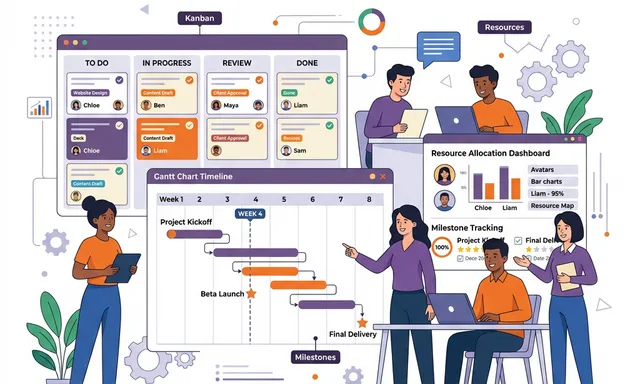
Kanban Boards
Visual workflow management:
- Columns represent stages (To Do → In Progress → Review → Done)
- Cards represent individual tasks with assignees, due dates, and descriptions
- WIP limits prevent overloading team members
- Swimlanes organize by priority, team member, or category
Best for: Operations teams, support teams, and ongoing work that doesn’t follow a fixed timeline.
Gantt Charts
Timeline-based project planning:
- Task dependencies — define which tasks must complete before others can start
- Critical path identification — know which delays will impact the overall deadline
- Resource allocation — visualize who is working on what, and when
- Milestone tracking — key dates and deliverables visible at a glance
Best for: Complex projects with dependencies, resource constraints, and fixed deadlines.
Burndown Charts
Sprint progress tracking:
- Planned work — total effort estimated at sprint start
- Remaining work — how much work remains as the sprint progresses
- Velocity tracking — how much work the team completes per sprint (avg over time)
- Forecast accuracy — comparing planned vs. actual velocity to improve estimation
Best for: Agile teams tracking sprint progress and identifying velocity trends.
Hard-Won Project Management Lessons
1. Requirements Are Never “Done”
No matter how thorough your discovery phase, new requirements will emerge. Build this expectation into your plan:
- Allocate a 15–20% contingency buffer for scope growth
- Implement formal change control — new requirements must be evaluated for impact on timeline and budget before approval
- Prioritize ruthlessly — not everything needs to be in the first release
2. Communication Frequency > Communication Quality
A perfect weekly status report is less valuable than daily 15-minute standups. High-frequency communication catches problems early when they’re cheap to fix.
Communication cadence we recommend:
- Daily: 15-minute standup (What I did, What I’m doing, What’s blocking me)
- Bi-weekly: Sprint review with stakeholders (demo working software)
- Monthly: Executive steering committee (budget, timeline, risks)
3. Visible Progress Builds Trust
Stakeholders lose confidence when they can’t see progress. Modern project management tools provide:
- Real-time dashboards showing project health at a glance
- Sprint demos of working functionality every two weeks
- Automated status reports generated from actual task completion data
- Risk registers that proactively flag concerns before they become crises
4. Resource Allocation Is the Hardest Part
Most project delays stem from people problems, not technical problems:
- Part-time allocation — team members juggling multiple projects deliver less on each one
- Key person dependencies — projects stall when a single expert is unavailable
- Skill gaps — discovering missing competencies mid-project
- Burnout — sustained overtime reduces productivity and quality
Best practice: Staff projects with dedicated team members at 80% allocation (20% buffer for meetings, admin, and unexpected interruptions).
5. Retrospectives Drive Improvement
After every sprint, ask three questions:
- What went well? — identify and reinforce good practices
- What didn’t go well? — identify problems without blame
- What will we change? — commit to specific, actionable improvements
Teams that consistently run retrospectives improve their velocity by 15–20% within 6 months.
Project Management With Odoo
Odoo’s project management module provides:
- Kanban boards with customizable stages and drag-and-drop cards
- Gantt chart views for timeline-based planning
- Timesheet tracking integrated with HR and project costing
- Subtask management for breaking complex tasks into manageable pieces
- Customer portal — let clients view project progress in real-time
- Integration with sales — convert quotations directly into projects
And because it’s part of the Odoo ecosystem, project costs automatically flow to accounting, timesheets feed into payroll, and resource allocation syncs with HR — no duplicate data entry.
Getting Started
Whether you’re managing internal projects, client engagements, or product development, NETLINKS Inc. can help you implement project management tools and processes that deliver consistent results.
Stay Informed with Expert Insights
Discover the latest trends in ERP, AI, and digital transformation from our certified technology experts.
100+



Resources to boost
your growth