- ERP
- Implementation
The Complete Guide to ERP Implementation: From Planning to Go-Live
Implementing an ERP system is one of the most impactful decisions a business can make. This comprehensive guide walks you through every phase — from discovery to continuous improvement — so you can avoid common pitfalls and maximize ROI.
Why ERP Implementation Matters
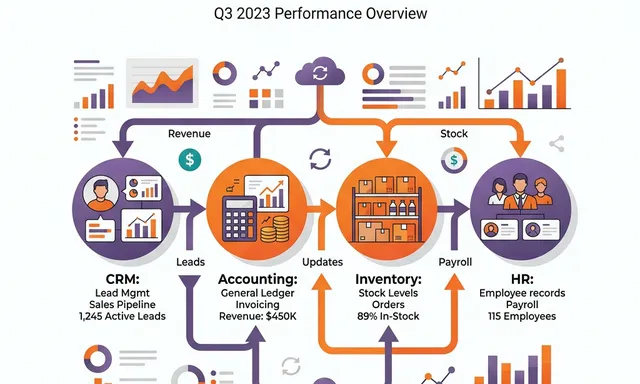
Enterprise Resource Planning (ERP) systems have become the backbone of modern business operations. They unify your CRM, accounting, HR, inventory, and project management into a single platform — eliminating data silos and giving decision-makers real-time visibility across the entire organization.
Yet according to industry research, nearly 75% of ERP implementations experience some form of failure — whether through budget overruns, missed deadlines, or poor user adoption. The difference between success and failure almost always comes down to methodology.
At NETLINKS Inc., we have refined our approach over 4,500+ successful implementations across 20+ years. In this guide, we share the exact framework we use to deliver projects on time and on budget.
The 6-Phase Implementation Methodology
Phase 1: Discovery & Requirements
Before writing a single line of code, we invest heavily in understanding your business. This phase includes:
- Stakeholder interviews across every department
- Process mapping to document current workflows
- Pain point identification through operational analysis
- Success criteria definition with measurable KPIs
The discovery phase typically takes 2–4 weeks and produces a comprehensive requirements document that becomes the foundation for everything that follows.
Pro tip: Don’t rush discovery. Organizations that invest an extra week in requirements gathering save an average of 3 weeks during development.
Phase 2: Solution Design
With requirements in hand, our architects design a solution that maps your business processes to ERP capabilities:
- Architecture design — how modules connect and data flows
- Module selection — choosing the right apps for your needs
- Integration mapping — connecting to existing systems (payment gateways, shipping providers, legacy databases)
- Data migration strategy — planning how historical data moves into the new system
- Detailed timeline — sprint-by-sprint project plan
Phase 3: Build & Configure
This is where your ERP takes shape. Using an iterative Agile approach, we configure and customize the platform in 2-week sprints:
- Core module configuration aligned with your workflows
- Custom development for unique business logic
- Integration development connecting third-party systems
- Trial data migrations to validate mapping accuracy
- Sprint demos so you see progress every two weeks
Phase 4: Testing & Validation
No ERP goes live without rigorous testing:
- User Acceptance Testing (UAT) — your team validates every workflow
- Integration testing — ensuring all connected systems communicate correctly
- Performance testing — load testing under peak conditions
- Security review — vulnerability assessment and access control validation
- Data validation — confirming 100% integrity of migrated records
Phase 5: Training & Go-Live
The most technically perfect ERP will fail if users don’t adopt it. Our training program is designed for real-world success:
- Role-based training customized for different user groups
- Administrator certification for your internal power users
- On-site go-live support with a dedicated NETLINKS team
- Hypercare period — rapid-response support during the critical first weeks
Phase 6: Continuous Improvement
Go-live is the beginning, not the end. Our ongoing engagement includes:
- Monthly check-ins to review system performance
- Optimization reviews to identify efficiency opportunities
- Feature enhancement planning as your business evolves
- Performance monitoring and proactive issue resolution
- Ongoing user support for questions and training refreshers
Common ERP Implementation Mistakes to Avoid
1. Insufficient Executive Sponsorship
ERP implementations require organizational change. Without a visible executive champion, teams resist adopting new processes and revert to old habits.
2. Underinvesting in Data Migration
“Garbage in, garbage out” is never more true than during an ERP migration. Allocate adequate time for data cleansing, mapping, and validation.
3. Skipping User Training
A 2-day training session isn’t enough. Plan for role-specific, hands-on training with follow-up sessions after go-live.
4. Trying to Replicate Legacy Processes
The biggest value of ERP comes from adopting best-practice workflows — not recreating your existing manual processes in a new system.
5. Going Live on Everything at Once
Phased rollouts reduce risk dramatically. Start with core modules and expand systematically.
How Long Does ERP Implementation Take?
Implementation timelines vary based on complexity:
| Business Size | Modules | Typical Timeline |
|---|---|---|
| Small (10–50 users) | Core modules | 8–12 weeks |
| Mid-market (50–200 users) | Core + customization | 12–20 weeks |
| Enterprise (200+ users) | Full suite + integrations | 20–40 weeks |
Measuring ERP Success
Define success metrics before you start. Common KPIs include:
- Order processing time reduction
- Invoice-to-payment cycle improvement
- Inventory accuracy increase
- Financial close time reduction
- User adoption rate above 85%
Ready to Start Your ERP Journey?
A successful ERP implementation doesn’t happen by accident — it happens by methodology. Whether you’re replacing spreadsheets, upgrading from an older system, or implementing ERP for the first time, NETLINKS Inc. has the experience and proven process to deliver results.
Stay Informed with Expert Insights
Discover the latest trends in ERP, AI, and digital transformation from our certified technology experts.
100+



Resources to boost
your growth